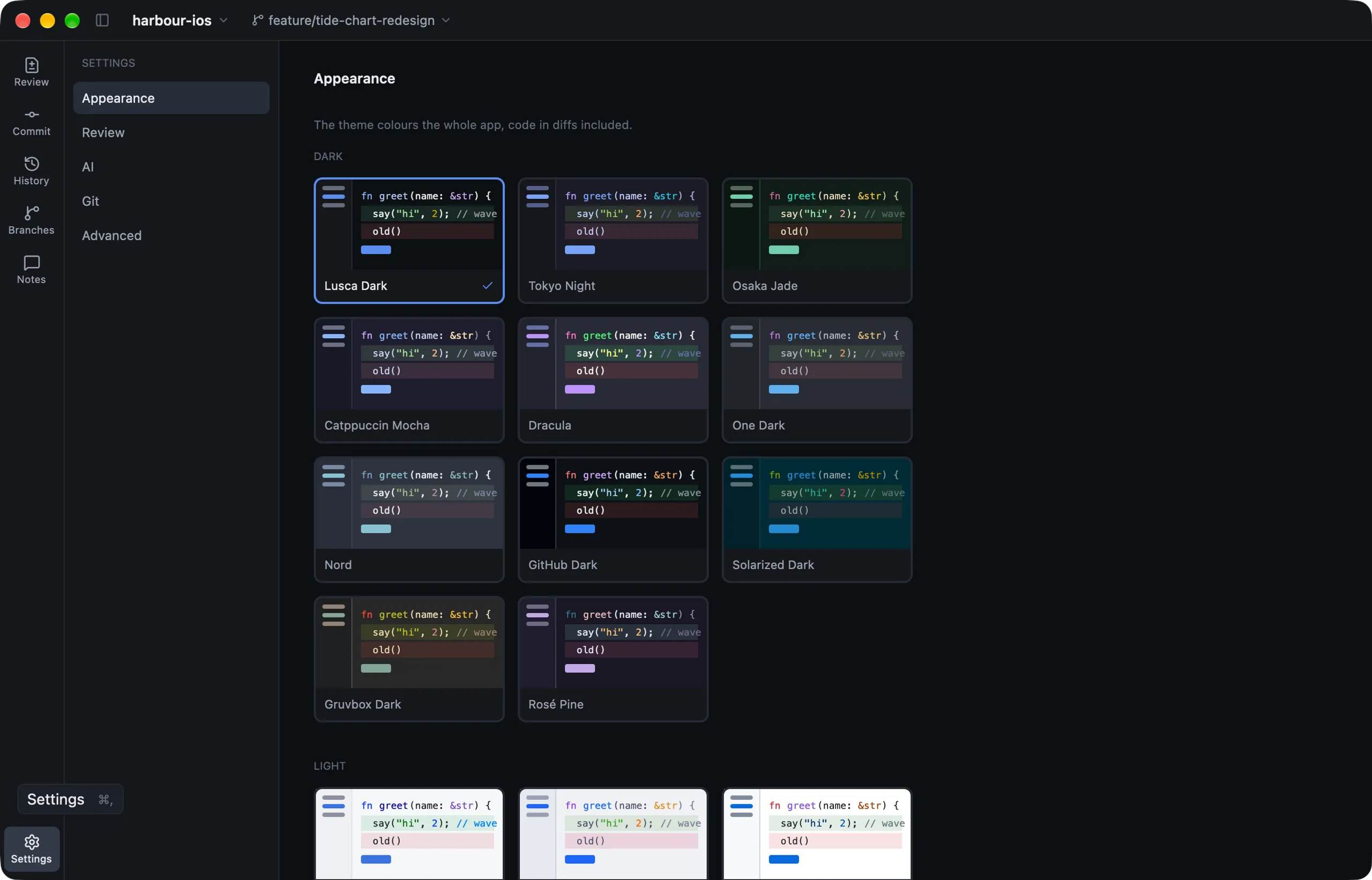
Open Settings with ⌘,.
| Section | What’s in it |
|---|---|
| Appearance | Theme, code font and size, page names, folders or a flat list |
| Review | What’s listed, the sort order, the image view and the diff layout |
| Git | Which Git and Git LFS Lusca uses, and folders to look in for them |
| AI | Provider, model and API key for suggestions |
| Advanced | Opens the settings file and the keyboard shortcuts file |
Themes
Lusca Dark and Light, Tokyo Night, Osaka Jade, Catppuccin Mocha and Latte, Dracula, One Dark, Nord, GitHub Dark and Light, Solarized Dark and Light, Gruvbox Dark, and Rosé Pine. The whole app follows the theme, code included.
The settings file
Settings live in ~/.config/lusca/config.toml. You can edit it by hand, and Lusca keeps your comments. A few useful ones:
[view]
mode = "side-by-side"    # or "swipe", "onion-skin", "difference"
text_layout = "unified"  # or "side-by-side"

[compare]
base = "origin/develop"  # the default base for branch review

[remote]
auto_fetch_minutes = 15  # 0 turns automatic fetching off

[appearance]
theme = "tokyo-night"